

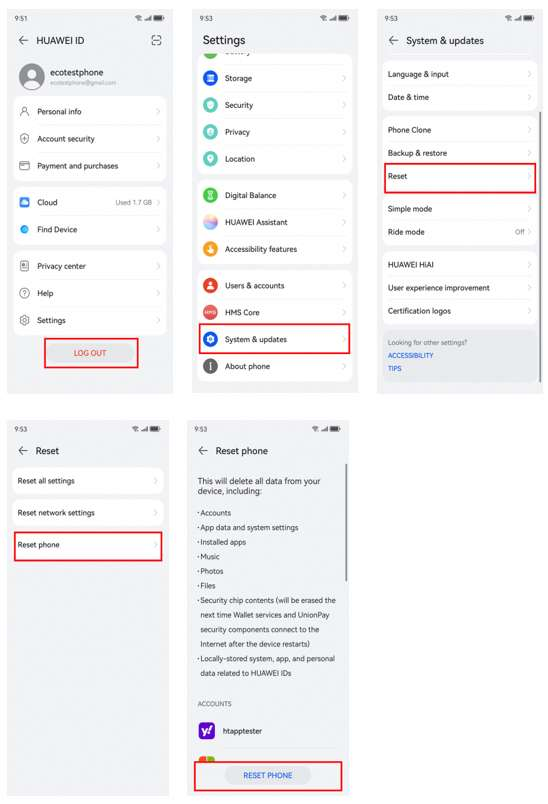
Resetting an old Huawei phone sounds simple until the setup screen asks for an account you have not used in years. That is where many people get stuck. The reset itself is usually straightforward; the harder part is making sure you can complete ownership verification afterwards and restore the apps you actually need.
Use the normal reset path when possible
If you can still enter the phone, use the built-in reset menu rather than third-party software. Go to Settings > System & updates > Reset > Reset phone and follow the prompts. Huawei warns that this erases accounts, apps, system settings, music, photos, and other internal files.
Before doing this, remove or recover accounts while you still have access. That small step can save a lot of trouble once the phone has been wiped.
Recovery mode is for erasing, not bypassing
If the lock-screen password is forgotten, Huawei’s support guidance allows a factory reset from Recovery mode. On many models, the phone is powered off and then started with the Power and Volume Up buttons. After entering Recovery, choose the clear-data or factory-reset option shown on the screen.
The exact menu can differ by model and system version. More importantly, Recovery mode only erases the device. It does not remove HUAWEI ID activation or Google account verification tied to the previous setup.
When the old account is unavailable
Try Google’s official account recovery using the email address, recovery phone number, or other verification options connected to the account. If the phone asks for a HUAWEI ID instead, use Huawei’s password-reset process.
For a used device, ask the previous owner to remove the phone from their account. If ownership is legitimate but recovery still fails, an authorised Huawei service centre is the safer next step. Bring proof of purchase and the device identifiers if available.
Restore apps only after activation
After the phone is activated legitimately, rebuild the app setup. The Huawei Community article linked through how to reset huawei phone without google account covers Google-related setup and troubleshooting on Huawei devices. It is useful after activation, not as a way to defeat the account check.
For anyone looking up how to reset huawei phone without google account, it helps to separate the job into two parts: erase the device safely, then recover or verify the account that protects it. After that, restore local banking, transport, maps, delivery, and messaging apps from trusted sources.